
Parking Kitty
City of Portland, OregonTravel & Local
4.61.88K Reviews
- Version
- 1.0.4
- Installs
- 500.00K
- Age Rating
- Everyone
Screenshots
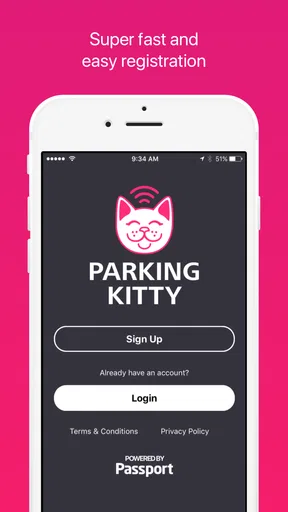
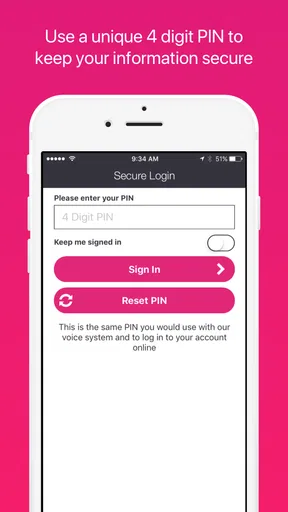
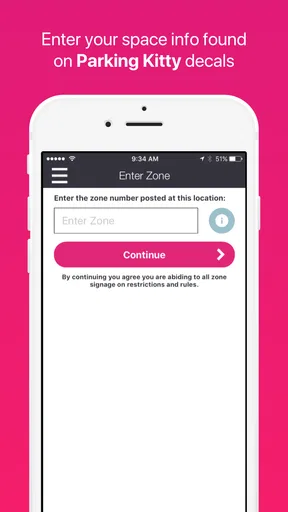
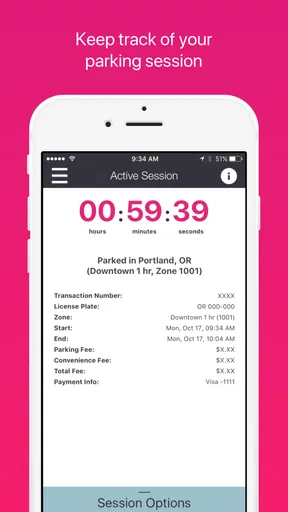
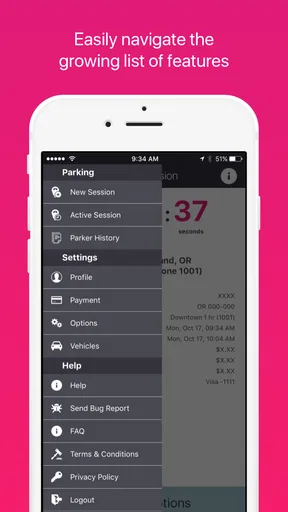
Our Review of Parking Kitty
 Analysis by Appyee
Parking in Portland can turn a simple errand into a small timing exercise: find a space, read the sign, remember the zone, locate a payment machine, and keep track of when the session ends. Parking Kitty is designed to move much of that process onto a phone. I found it most useful when I treated it less like a general travel app and more like a focused parking tool for Portland streets and participating locations.
That narrow purpose is also its main strength. It is not trying to replace a full navigation service, public-transit planner, or city guide. Instead, it concentrates on the moment when I have already arrived, or am about to arrive, and need to handle parking without standing beside a meter. The app is free, aimed at everyone, and comes from the City of Portland, Oregon, which gives it a practical civic feel rather than the broad, commercial approach of many private parking platforms.
How I use Parking Kitty from arrival to departure
I use a consistent arrival-to-departure routine so the app handles payment without taking my attention away from the street signs. This section follows that sequence and highlights a useful safeguard for trips where plans change: I treat the session end time as a prompt to reassess, not as permission to stay parked.
The basic parking routine is straightforward
My first habit is to stop before starting a session and confirm the location shown in the app against the street sign or parking information nearby. That pause matters. A phone can identify a nearby area, but “nearby” is not always the same as the space where the car is actually parked. Entering the wrong zone can create a problem even when the payment process itself works perfectly.
Once the location is clear, I select the relevant parking area, enter the vehicle information requested by the app, and choose the amount of parking time available for that location. The useful part is that I can handle the transaction from the curb instead of walking to a machine, searching for coins, or returning to the car with a printed receipt. I still read the posted restrictions because the app does not replace the signs that explain when and where parking is allowed.
A realistic example is a short appointment downtown. I park, check the zone on the sign, open Parking Kitty, and begin the session while I am still near the car. Before walking away, I look once more at the selected vehicle and location. That final check is a small habit, but it prevents the kind of rushed mistake that is harder to fix after leaving the block.
The app is especially convenient when plans change. If an appointment runs long, I can check the active session rather than relying on memory. Depending on the rules of the location and the options presented for that session, I may be able to extend it from the phone. I would not assume every parking area offers identical choices, so I treat the screen and the signs as the authority for that particular stop.
What the app does better than a meter
The clearest advantage is the reduced friction around payment. A traditional meter can be perfectly adequate for a quick stop, but it requires me to find the machine, understand its controls, and return to the vehicle if I need more time. Parking Kitty makes the phone the main interface, which is helpful when the weather is unpleasant, when I am carrying bags, or when the nearest machine is not close to the space.
Another practical benefit is the active-session view. I can use it as a reminder that parking is still running, rather than trying to reconstruct the start time from memory. That is more useful than it sounds. People often remember the purpose of a trip but forget the exact minute they parked, especially after moving between shops, appointments, and restaurants.
Compared with a general navigation app, Parking Kitty is more focused at the payment stage. Navigation apps are better for reaching an area and comparing routes, while this app is better suited to managing the parking transaction itself. Compared with cash or a meter, it offers more control from the phone but depends more heavily on having the device available and the process completed correctly.
Settings I check before relying on it
I recommend reviewing the account and vehicle details before the first stressful parking stop. The most important practical question is whether the selected vehicle is the one actually being driven. Households with more than one car, borrowed vehicles, or work vehicles should be especially careful here. A saved vehicle makes repeat use faster, but convenience can become a liability if I tap through without checking.
I also pay attention to notifications and phone permissions that affect reminders or app operation. I do not treat a notification as a substitute for reading the parking rules, but a reminder can be useful when an appointment is unpredictable. If notifications are disabled, muted, or restricted by the phone, I lose one of the app’s more helpful safety nets.
Location access is another setting worth understanding. A location signal can help with nearby parking information, but I still verify the zone manually. Dense streets, large buildings, and adjacent parking areas can make automatic location suggestions less reliable than a quick look at the sign. My preferred workflow is to use location assistance for speed and the physical sign for confirmation.
Before a long day of errands, I make sure the phone has enough battery and that mobile connectivity is available. This is not a criticism unique to Parking Kitty; it is simply the trade-off of replacing a physical meter with a digital process. A dead battery can be more inconvenient than carrying change, so I keep a backup payment approach in mind when I know I will be away from the car for a long time.
Small habits that make repeat parking faster
Experienced use comes from repetition rather than complicated tricks. I keep the app easy to reach on my phone, but I do not open it until I have identified the correct zone. That order saves time because it prevents me from browsing first and interpreting the street afterward. The sign tells me where I am; the app handles the transaction.
I also make a deliberate “three-point check” before walking away: vehicle, location, and end time. It takes only a few seconds. The vehicle check is useful for anyone with multiple saved cars, the location check guards against neighboring zones, and the end-time check tells me whether the session matches the length of the visit.
For recurring trips, I use the same sequence every time instead of relying on muscle memory. I park, read the sign, select the vehicle, verify the location, start the session, and then confirm the active status. This may sound slower than tapping quickly, but it becomes faster over time because I spend less time correcting avoidable mistakes.
When I expect to leave close to the session’s end, I set a separate personal reminder as well. That is a useful distinction: the app can help manage the parking session, while my own calendar or alarm can remind me about the appointment or departure plan. Combining the two is more dependable than expecting one tool to cover every part of the day.
For visitors, I suggest installing and opening the app before arriving at a busy area. Creating an account or entering vehicle details at the curb is possible, but it adds pressure when traffic is waiting behind the car or the weather is bad. Preparing at home lets the first real parking session focus on the zone and the time rather than setup.
Where the digital approach reaches its limits
Parking Kitty does not eliminate the need to understand Portland’s parking rules. It cannot make an illegal space acceptable, interpret every temporary restriction for me, or guarantee that a nearby space is available. I still need to read signs, check curb markings, and notice changes such as loading restrictions or event-related instructions. This is the most important limitation for anyone expecting the app to act as a complete parking decision-maker.
The app is also not the best answer for every kind of trip. If I am making a very quick stop beside a functioning meter and already have a simple payment method, the physical option may be quicker. If my main need is finding a destination, planning a route, or comparing transit choices, a navigation or travel app is more appropriate. Parking Kitty becomes most valuable once the task is specifically managing a Portland parking session.
Phone dependence is another trade-off. Poor reception, a low battery, a forgotten password, or an unavailable payment method can interrupt the process. I would not begin a long parking session without checking that the app opens normally and that the phone is usable. Keeping a backup option is sensible, particularly on days when the car will be parked for several hours.
There is also a learning curve for occasional users. The interface is focused, but a first-time visitor may still need a moment to understand the relationship between the street sign, the location selection, the vehicle, and the session. The solution is not to tap faster; it is to slow down during the first setup and make sure the account reflects the car being used.
Who will get the most from it
I think Parking Kitty suits Portland residents, commuters, and visitors who park in the city often enough to value a repeatable routine. It is particularly helpful for people who dislike handling coins, frequently extend visits, or move between appointments where remembering a meter’s end time is difficult. Drivers who regularly use the same areas can benefit from having their details ready and following a familiar confirmation process.
It is also a good fit for anyone who prefers a digital record of parking activity. A phone-based session is easier to review than a vague memory of feeding a meter, although I still recommend checking the active session and keeping any important confirmation information until the trip is finished.
I would be more cautious recommending it to someone who rarely parks in Portland, has an unreliable phone, or strongly prefers physical payment. Occasional users may find a meter more immediate, especially for a very short visit. The app is free, so cost is not the barrier; the real question is whether the convenience of a phone-based workflow outweighs the need to keep the phone charged, connected, and correctly configured.
What its track record suggests, and what it does not change
Parking Kitty has been available since May 17, 2017, and its current version is 1.0.4. It supports Android devices running version 4.4 or later, which makes it accessible on older phones than many newer apps. The app has an average rating of 4.6 from around 5.8 thousand ratings, with more than 500 thousand installs. Those figures suggest that it has found a substantial audience, but they do not remove the need to check the exact parking instructions at the location.
The app is listed as free and carries an Everyone content rating. That makes it easy to recommend as a low-risk utility for general drivers, families, and visitors. The developer is the City of Portland, Oregon, which is relevant because the app’s usefulness is tied to the city parking environment rather than to a nationwide network of unrelated services.
My overall impression is that Parking Kitty is strongest when used as part of a disciplined parking routine. It is not magic, and it is not a replacement for attention. Its value comes from removing several small inconveniences while leaving the driver responsible for choosing the legal space, confirming the zone, and selecting the correct vehicle and duration.
My verdict after using it as a daily tool
I would recommend Parking Kitty to anyone who parks in Portland regularly and wants a quicker alternative to walking to a meter. The best results come from combining the app with three habits: prepare vehicle details in advance, verify the zone from the street sign, and check the active session before leaving the car. Those habits make the experience feel dependable instead of rushed.
It is less compelling for a one-off short stop, for drivers who prefer cash, or for anyone looking for navigation and local discovery rather than payment management. In those situations, a meter or a broader travel app may be the better tool. For its intended job, though, this Travel & Local app is focused, practical, and easy to justify because it is free.
After a few uses, the process becomes almost automatic without becoming careless. I still read the signs, but I no longer need to hunt for a machine or wonder whether I will remember the parking deadline. That balance is what makes the app worthwhile: it saves time at the curb while encouraging a clearer record of the session. For Portland drivers who want that specific convenience, it is a useful addition to the phone.
Verdict
Strengths of Parking Kitty
- Quickly pay for parking from your phone without searching for a meter.
- Shows nearby parking zones and helps identify where payments are accepted.
- Lets you extend your session remotely when your plans change.
- Sends reminders before your parking time expires.
- Digital receipts make expense tracking and reimbursement easier.
Limitations of Parking Kitty
- Coverage is limited to participating cities and parking locations.
- Location detection can be inaccurate in dense urban areas.
- Service fees may increase the total cost of short parking sessions.
- A stable internet connection is needed for payments and extensions.
- App problems or delays can make starting a session inconvenient.
Similar Picks in This Category
View All
Google Maps
Google LLC3.4

Google Maps Go
Google LLC4.1

Booking.com: Hotels & Travel
Booking.com Hotels & Vacation Rentals4.8

Google Earth
Google LLC3.8

Skyscanner Flights Hotels Cars
Skyscanner Ltd4.8

trivago: Compare hotel prices
trivago N.V.4.4
Frequently Asked Questions
What is Parking Kitty and what can I use it for?
Parking Kitty is a mobile parking app that lets you pay for parking from your Android or iOS device in participating locations. After creating an account, you can enter the parking zone, choose how long you want to stay, and start a session without using a meter. The app can also display active sessions, payment details, and parking history.
How do I pay for parking with Parking Kitty?
To pay, open Parking Kitty, select the correct parking area or zone, enter your vehicle and payment information, and choose the desired parking duration. Before confirming, carefully check the location and license plate details because selecting the wrong zone or vehicle may result in an invalid payment. Available payment methods can vary depending on the city or parking operator.
Can I extend my parking session remotely?
In many supported areas, Parking Kitty allows you to extend an active parking session directly from the app, which is useful when you are delayed or want to avoid returning to a parking meter. Extensions are subject to local rules, maximum stay limits, and zone availability. The app does not override posted restrictions, so always check the signs before extending.
Does Parking Kitty charge extra fees for using the app?
Parking Kitty may apply a convenience or service fee in addition to the regular parking charge, depending on the city and local parking program. The total amount should be shown before you confirm the transaction. Because fees and policies can differ between locations, review the payment summary carefully and check the local terms if you want to understand the exact cost.
What should I do if I receive a parking ticket despite using Parking Kitty?
First, verify that you selected the correct zone, entered the correct license plate, started the session successfully, and paid for enough time. Keep the digital receipt and session information available, as they may help with an appeal. Parking Kitty payments generally do not guarantee immunity from tickets caused by incorrect details, expired sessions, restricted areas, or other local parking violations.
